In pilot · Course Design Studio
AI can write the essay. Prove what the student can do.
Redesign one assessment for the AI era in about an afternoon, and leave with an oral defence kit you can use next term.
- No student records
- Word documents you own
- A named reviewer signs
Why it exists
Assessment changed the day AI learned to write.
- 01
Fluent work is now free
A student can produce competent-looking work in seconds. The written product alone no longer shows who did the thinking.
- 02
Detection is a dead end
Trying to catch machine-written text turns teaching into suspicion, and a wrong call lands on a student. The right question is not whether a machine wrote it.
- 03
Know what the student can do
Keep the written work, open the tool under a stated rule, and add a short oral defence of the reasoning. The fix is in the design.
AI capability is not the bottleneck; faculty time, trust and adoption are. So every stage is short, and every document is yours.
How it works
Nine short stages. One assessment.
Work through them in order, go back to any stage, and stop when you need to. Every save is kept as a version.
Map
Find where AI changes the assessment.
- 1
Map where AI touches the course
Rate each assessment for how easily AI can now produce it, and decide what work must stay with the student.
- 2
Pick one assessment
Choose the one assessment to change first. Change one thing well.
Design
Build the assessment around the reasoning.
- 3
Name the competenceCritical
One sentence: the reasoning this assignment certifies, linked to a course outcome.
- 4
Keep the product, open the tool
Keep the written work, state the AI rule, and draft the syllabus statement and student declaration.
- 5
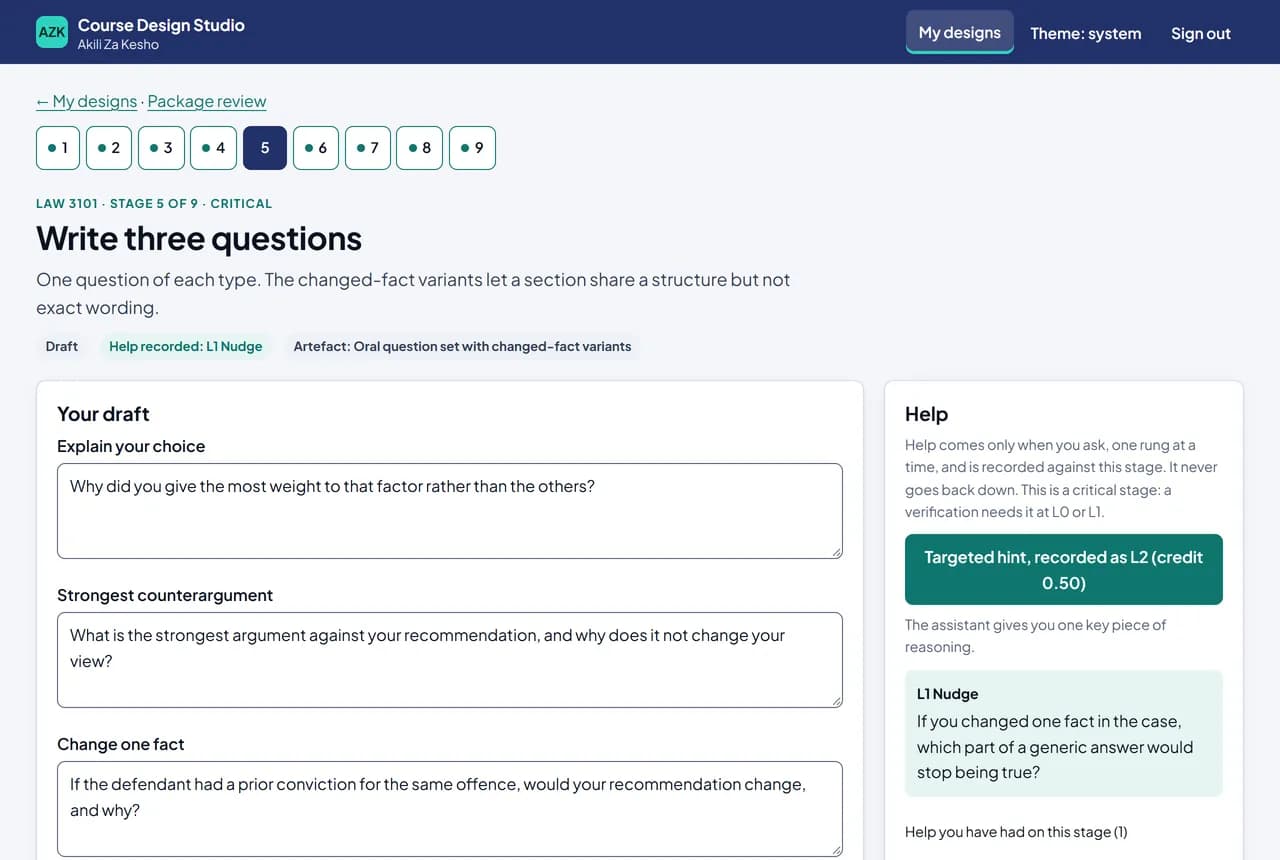
Write three questionsCritical
Explain your choice, the strongest counterargument, and change one fact, with variants for each section.
- 6
Build the short rubricCritical
Three dimensions, two levels, anchored to your sentence. It scores reasoning, not poise.
- 7
Set the logistics
Choose live or recorded, every student or a sample, and see the marking load before you commit.
Defend
Test it with peers, run it, learn from it.
- 8
Peer clinic
Colleagues review the package, with a crosswalk that cites standards by number.
- 9
Run it, then debrief
Enter pass counts and a double-scored sample. The studio computes agreement and frames next term.
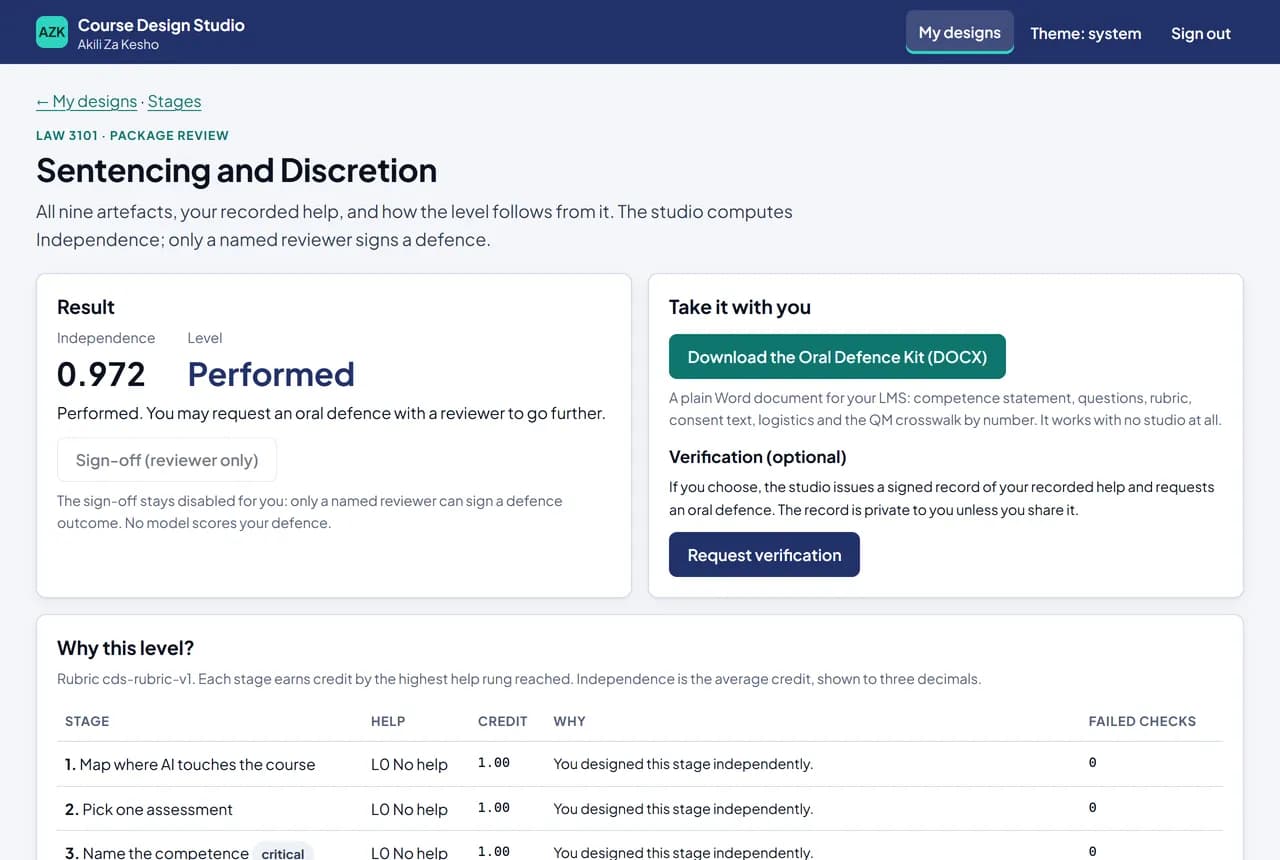
Critical stages 3, 5 and 6 carry the reasoning. To be verified, you need them done on your own or with a nudge at most. Then, if you choose, defend your design to a named reviewer.
What faculty leave with
A kit you can use next term.
The written work carries the grade. The oral is a pass or not-yet gate on the reasoning, and a non-pass goes to a second rater or a re-sit, never an automatic loss of credit.
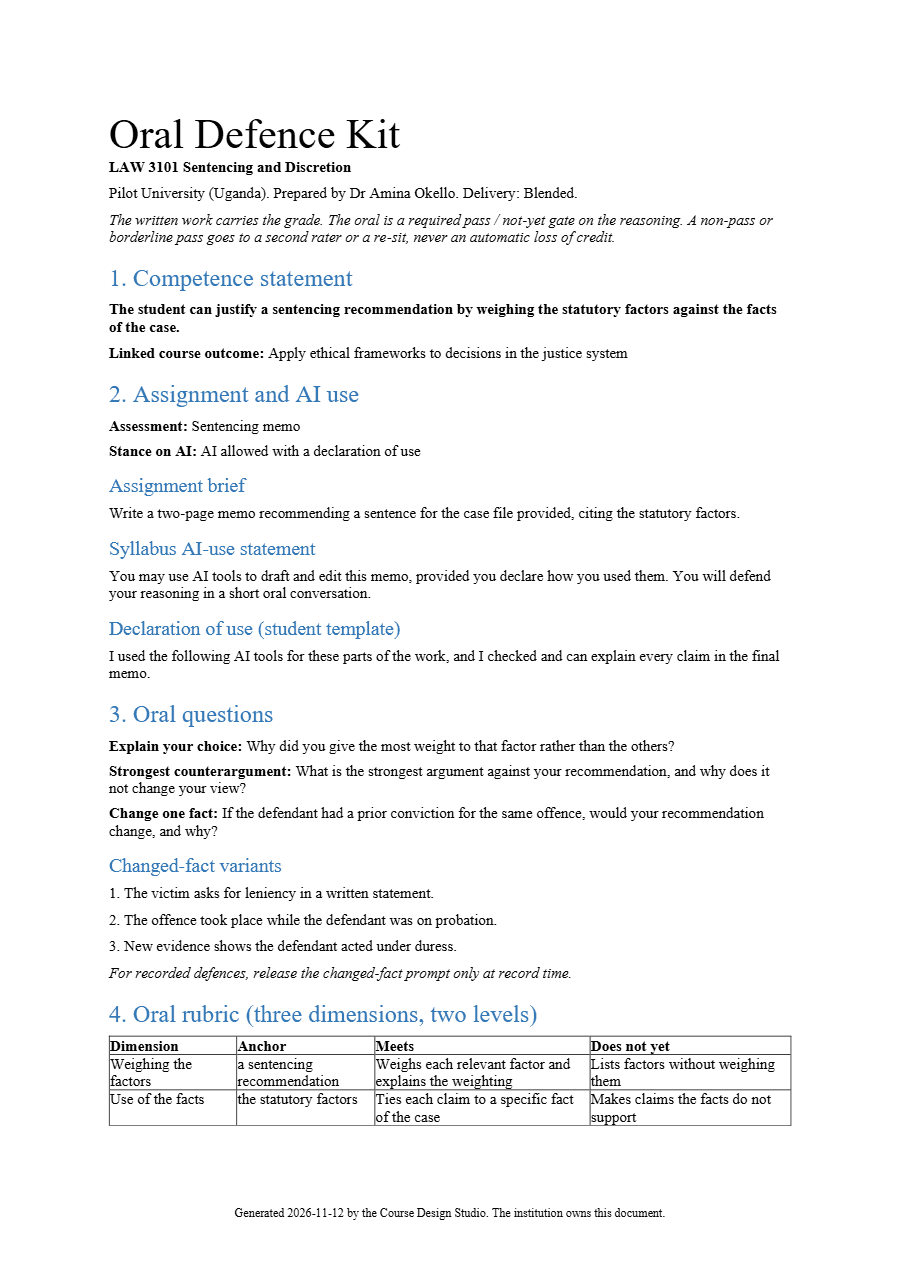
Oral Defence Kit
One plain Word document with everything below, plus logistics, consent and accommodation text. It works without the studio, and your institution owns it.
AI-use statement
A syllabus statement and a student declaration-of-use template that match the stance on AI you chose. Any stance, including no AI.
One-page rubric
Three dimensions, two levels: meets or does not yet. Anchored to your competence sentence.
Defence questions
Explain your choice, the strongest counterargument, change one fact. Variants keep the structure and change the wording.
Human in charge
The AI suggests. You decide.
Advice, not decisions
Every AI draft is a suggestion you edit or ignore. The structural checks are written as code, never as AI judgement, and a failed check is a free “Not yet”.
A named reviewer signs
No model scores your defence or suggests a pass. A reviewer from your institution hears it, records the outcome, and signs with a one-time code.
Signed, verifiable evidence
Each verification and signed defence becomes a record signed with Ed25519 and chained, so anyone can check it offline against the published keys.
Help is graded, never banned
Ask for help one rung at a time. Each rung is recorded against the stage and earns a little less credit. Use the top rung everywhere and you still leave with the kit, just without a verification.
For institutions
Built for a faculty, not a single login.
Run it for a department or a whole institution, with the controls a programme lead and an IT office expect.
A workspace per institution
Each institution’s data is separated in the database itself, by row-level security on every tenant table.
Admin and AI budget controls
Members, roles and reviewers. A monthly AI budget with alerts at 80% and 100%; at the cap, help falls back to an offline checklist.
An audit log you can download
Every AI call, signature, share, export and admin change, append-only and hash-chained.
Hosted in the EU
The studio and its database run on one server in Vilnius, Lithuania. Each institution’s data region is set out in its pilot agreement.
No student data in prompts
Input that looks like student data is refused before any AI call, including names on your roster blocklist.
Single sign-on and LMS linksComing
Your institution’s sign-on and an LMS launch.
Privacy and trust
Safeguards, stated plainly.
No student records
The studio never grades students and holds no student submissions or recordings. The debrief stage takes counts only.
Student data is refused, not hidden
Email addresses, phone numbers, student-ID patterns and roster names are rejected with an explanation, never silently redacted.
AI runs only on our server
No AI key reaches a browser, and every build is scanned to prove it. The log keeps token counts and a hash of each prompt, never the prompt text.
Live AI only with zero retention
Live model help is switched on only once a zero-data-retention arrangement with the model provider is in place.
Private by default
Your verification record is yours. You choose whether to share it with your department head, and you can stop sharing.
Standards by number
The peer clinic cites Quality Matters General Standards by number only. The studio makes no accreditation claim.
Evidence signing keys are public at studio.akilizakesho.com/.well-known/cds-keys.json.
Questions
What deans and faculty ask first.
Is student work sent to AI?
No. The studio works on course design material: outcomes, the brief, questions and the rubric. It never receives student submissions or recordings, and it refuses input that looks like student data before any AI call. If you record defences, the recordings stay in your own learning platform.
Does the AI grade anything?
No. The AI never grades students and never scores a faculty member’s defence. It helps only when you ask. The checks are written as code, and a named reviewer from your institution signs the defence outcome.
What do faculty need?
A web browser, access from your institution’s administrator, and one assessment you want to redesign, with its course outcomes. There is nothing to install. A practice run on a sample course is never scored or shared.
How long does it take?
The nine stages are designed to take about an afternoon for one assessment. You can stop and come back at any point; every save is kept.
Is this the same as Akili Za Kesho Labs?
No. Labs is where learners build tech skills hands-on. The Studio is for the people who teach and design courses. They share one Akili Za Kesho account.
Can we run a pilot?
Yes. Email info@akilizakesho.com and we will agree a scope, success criteria and a quote for your institution.
Change one assessment well, this term.
Start with a pilot in one department. We will agree the scope with you. Pricing is quoted per institution.
Looking to learn rather than teach? Compare Labs and the Studio.